
Documentation
Lazada Sync: Full Guide & Integration
Lazada Sync (lazada-sync) connects your LiteShoper store to Lazada Open Platform (LAOP) so you can sync shops, products, inventory, orders, logistics, returns, promotions, and finance from one admin.
On this page: Overview · Prerequisites · Apply / register · Create app · Credentials · OAuth redirect · API permissions · Install plugin · Settings · Connect shops · Webhooks · Cron · Products & inventory · Orders & logistics · URLs · Checklist · Troubleshooting
1. Overview
- Authorize Lazada seller shops (MY, SG, TH, PH, ID, VN + Crossborder)
- Import / export products and link SKUs for stock sync
- Sync orders via Push Mechanism (webhooks) + cron backup
- Arrange shipment, print AWB / packing / pick lists
- Returns, promotions, and finance views (where API allows)
Plugin page: liteshoper.com/plugins/lazada-sync
2. Prerequisites
- LiteShoper store with HTTPS (required for OAuth + webhooks)
- Active
lazada-synclicense / Marketplace access - Lazada Sync plugin installed and activated
- A Lazada seller account in at least one SEA market (MY, SG, TH, PH, ID, VN) or a Crossborder seller account
- Access to Lazada Open Platform to create an app
3. Apply / register on Lazada Open Platform
- Open https://open.lazada.com/
- Sign in with your Lazada seller or developer account (register if prompted)
- Complete any verification Lazada requires for developer / app console access
- Open App Console — you should be able to create an app
Seller Centre alone is not enough. You need Open Platform to get App Key and App Secret.
4. Create a Lazada app
- In App Console click Create App
- Choose the category that matches your use case:
- Seller In-house APP — your own store(s) only (often whitelist up to ~30 sellers). Best for most merchants self-hosting LiteShoper.
- ERP / OMS — multi-seller tools; requires Lazada review.
- Fill app name, description, and contact details (e.g. “LiteShoper Sync – YourStore”)
- Submit / save. Wait for approval if Lazada requires it before production API access
5. Get App Key & App Secret
- Open your app → App Overview (or Basic Info)
- Copy App Key and App Secret
- Keep App Secret private — paste it only in LiteShoper → Lazada → Settings
Official API docs: open.lazada.com/doc/api.htm
Visual how to setup app lazada
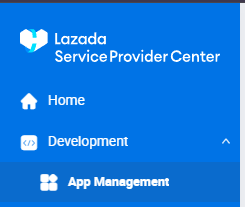
- After login into lazada app, go to Development > app management
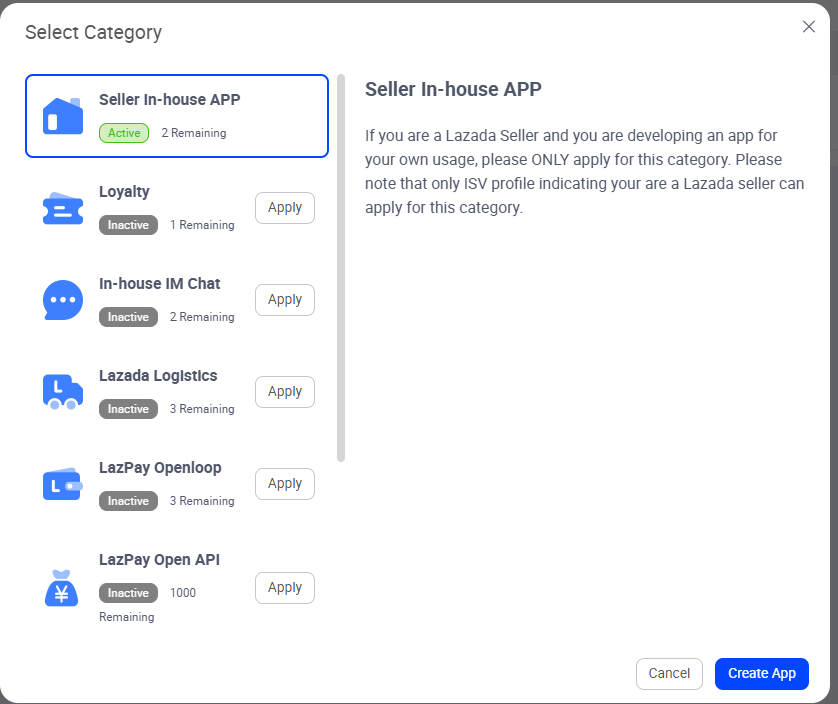
2. Click create app button, after that image like popup below will appear. for first time you need apply 'Seller in-house App', wait 1-2 days, after approve, you can select seller in-house APP, then click create app. after that you need follow instruction, when done fill form form that, you will be able open app.
After done, it will show like below

3. Click manage button, click push mechanism tab like image below
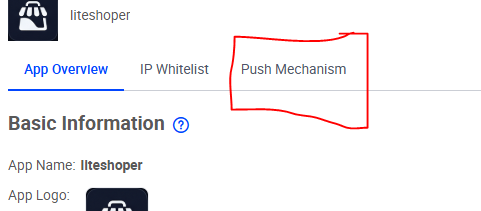
4. check all box and enter webhook, you can see webhook url on your website after you install plugin(on you website go to Lazada > Setup Guide)
5. after done, click app overview tab again. You will see apply online button at top right, click that and it will show like image below. fill it. Just fill like you open a website for marketplace stock sync.
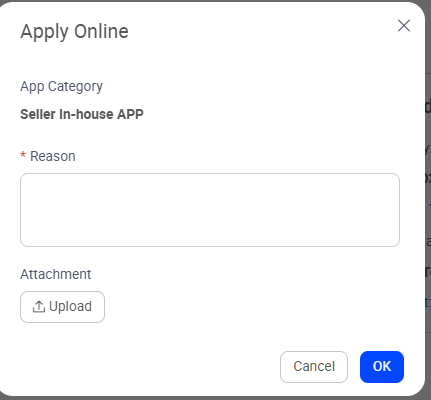
6. after done and approved, go to at bottom like image above and click Add button

7. after that you will see form like below:
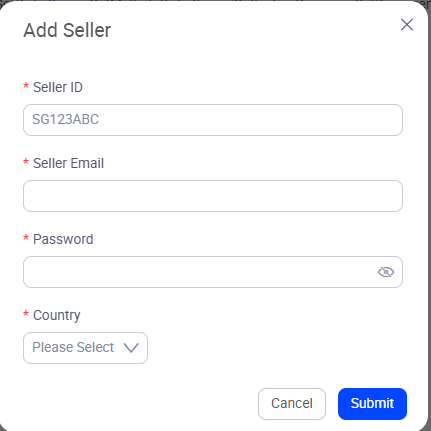
8. to get seller id, login into your seller lazada, open setting, and you will see short code(see image below)
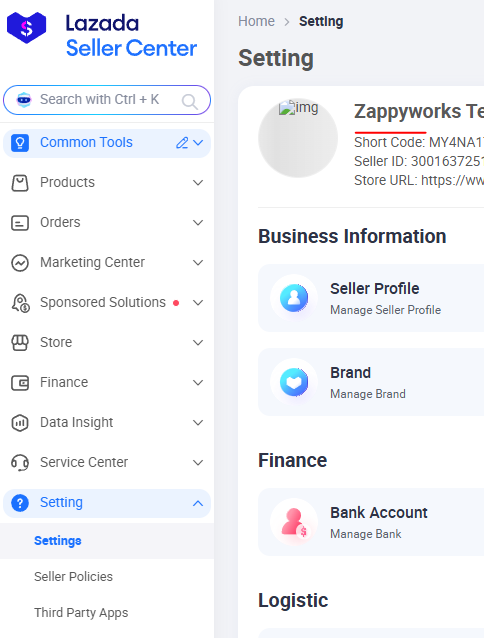
9. after fill all and save, you are ready to add lazada shop from your website
6. Configure OAuth redirect URL
In App Console → App Management → Auth Management, set the callback / redirect URL to exactly:
https://YOUR-STORE.com/lazada/callbackMust match character-for-character (including https://). LiteShoper handles OAuth at this route.
Seller whitelist (In-house APP)
If your category uses a whitelist, add your seller short code under Auth Management → Authorized Seller Whitelist (often semicolon-separated). Only whitelisted sellers can complete OAuth.
Crossborder sellers
- On the Lazada authorization page, select Crossborder from the country dropdown
- Log in with your MY seller credentials (typical for Crossborder)
- Authorize once — the token can cover all six ventures (MY, SG, TH, PH, ID, VN)
- In LiteShoper → Lazada → Shops, connect using country MY (or your primary venture)
7. Enable API permissions
Lazada does not use granular OAuth scopes in the authorize URL. Permissions come from your app category and enabled API groups in LAOP. Request access to:
| API group | Used for in LiteShoper |
|---|---|
| Product API | Import, export, link inventory, stock sync |
| Order API | Order import, Orders → Lazada tab |
| Fulfillment / Logistics API | Arrange shipment, AWB print |
| Reverse / Returns API | Returns page |
| Finance API | Order finance / margin (varies by country) |
| Promotion API | Promotions / vouchers |
| Seller API | Shop profile, logistics setup |
In App Console open API Permission (or API Access) and request what you need. Use Sandbox mode in LiteShoper while testing.
8. Install Lazada Sync on LiteShoper
- Subscribe / install from LiteShoper → Lazada Sync
- Activate the plugin
- Open admin menu Lazada (Settings, Shops, Products, Orders, etc.)
9. Enter credentials in LiteShoper
Go to Lazada → Settings:
- Paste App Key and App Secret
- Set Default country (MY / SG / TH / PH / ID / VN)
- Enable Sandbox mode only if using Lazada sandbox credentials
- Optional: order sync window (days), auth-expiry notify
- Click Save settings
10. Connect seller shops
- Open Lazada → Shops
- Choose country and click Connect Shop
- Sign in on Lazada and approve the app
- You return to
/lazada/callback; the shop shows as active - Repeat per local seller account (skip if one Crossborder auth covers all)
Each shop is stored as seller_id:country. Tokens refresh automatically when cron is running.
11. Webhooks (Push Mechanism)
Lazada push subscriptions are configured in the LAOP console (not via API registration).
- Copy webhook URL from Lazada → Settings → Webhooks:
https://YOUR-STORE.com/lazada/webhook - In LAOP → your app → Push Mechanism, add that callback URL for each event type
- In LiteShoper, tick the matching events and save
| Event | When to subscribe |
|---|---|
| Order Status Change (0) | Instant order sync |
| Product Update (3) | Catalog / stock changes from Lazada |
| Reverse Order (10) | Returns / refunds |
| Auth Token Expiration (8) | Early re-auth warning |
| Seller Status Update (13) | Shop closure / deauthorization |
12. Cron (backup sync)
Schedule every 5–15 minutes:
GET https://YOUR-STORE.com/cron/lazada-sync?token=YOUR_CRON_SECRETEnable tasks under Lazada → Settings → Cron. Webhooks handle real-time events; cron processes the queue, polls orders, refreshes tokens, and runs bulk jobs. Optional: enable auto arrange shipment under Automation + Logistics defaults.
13. Products & inventory
- Lazada → Import from Lazada — pull existing listings
- Lazada → Export to Lazada — push LiteShoper products
- Lazada → Link Inventory — map LiteShoper variations ↔ Lazada SKUs
- Manage stock from Marketplace Stock / Commerce as needed
14. Orders, logistics, returns, promotions
- Orders → Lazada (or Lazada → Orders) — import, arrange shipment, print labels
- Lazada → Logistics — warehouses & shipment providers before arranging
- Lazada → Returns — reverse orders
- Lazada → Promotions — vouchers / flexi-combo (if API allowed)
- Lazada → Sync Logs — debug failed API calls
15. Supported regions
- MY — api.lazada.com.my
- SG — api.lazada.sg
- TH — api.lazada.co.th
- PH — api.lazada.com.ph
- ID — api.lazada.co.id
- VN — api.lazada.vn
Sandbox host (when enabled): api.lazada.test
16. URL reference
| Path | Purpose |
|---|---|
/lazada/callback |
OAuth callback after seller authorizes |
/lazada/webhook |
Lazada Push Mechanism (POST) |
/cron/lazada-sync?token=… |
Scheduled sync worker |
/lazada/print/{type} |
Picklist / packing / AWB (admin login) |
17. Go-live checklist
- App approved; production App Key / Secret in LiteShoper
- OAuth callback URL exact match
- Seller whitelist includes your shop (if In-house)
- Required API groups approved
- Sandbox OFF for live sellers
- Push Mechanism events + LiteShoper webhook events enabled
- Cron running every 5–15 minutes
- Test: connect shop → export/import 1 product → link SKU → sync 1 order → arrange shipment
18. Troubleshooting
| Issue | Fix |
|---|---|
| OAuth redirect mismatch | LAOP callback must equal https://YOUR-STORE.com/lazada/callback |
| Invalid signature / API errors | Correct App Secret; accurate server clock; correct country host |
| Cannot authorize | Add seller to Authorized Seller Whitelist (In-house) |
| Webhook 401 | App Key/Secret saved; signatures verified with App Secret (or webhook secret) |
| No orders syncing | Shop connected; Order API enabled; cron scheduled; check Sync Logs |
| Finance data missing | Finance API may be unavailable in some countries |
| Token expired | Re-connect from Shops; enable Auth notify cron |
Official references:
Lazada Open Platform · API documentation · LiteShoper Lazada Sync